
hOmeLabs 50 Pint Wi-Fi Dehumidifier Review: Clear Ratings and 7,000 Sq Ft Coverage
hOmeLabs' 50 pint Wi-Fi model is rated at 50 pints at 80 degrees F and covers up to 7,000 sq ft.
 By Daniel Brooks
Updated October 24, 2026
The hOmeLabs 50 Pint Wi-Fi Dehumidifier quotes its capacity at a realistic 80 degrees F and 60% humidity as well as a hot-weather maximum, and covers up to 7,000 sq ft. It is one of the most clearly rated portable compressor dehumidifiers we cover.
Our Verdict
This hOmeLabs is a strong choice for large basements and open floors. It removes up to 50 pints a day at 80 degrees F and 60% RH, up to 120 pints at 95 degrees F and 90%, and Wi-Fi lets you control it remotely. Turbo raises airflow from 188 to 218 CFM when you need fast drying.
The drain hose is not included on this version, and there is no pump.

hOmeLabs 50 Pint Wi-Fi Dehumidifier
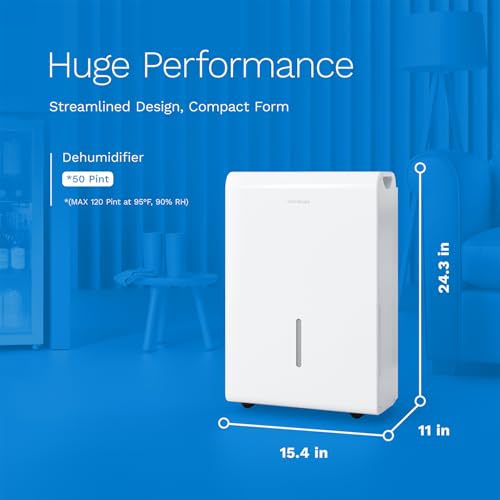


As an Amazon Associate we earn from qualifying purchases. Product prices and availability are accurate as of the date/time indicated.
Key Specifications
| Feature | Specification |
|---|---|
| Brand | hOmeLabs |
| Model | 50 Pint Wi-Fi |
| Capacity | 50 pints per day at 80 degrees F, 60% RH |
| Maximum | 120 pints per day at 95 degrees F, 90% RH |
| Coverage | Up to 7,000 sq ft |
| Airflow | 188 to 218 CFM |
| Smart Control | Wi-Fi |
| Weight | About 40 pounds |
Capacity and Coverage
hOmeLabs lists both figures, which makes comparing it fair. At 80 degrees F it matches big-brand 50 pint units, and its stated coverage reaches up to 7,000 sq ft.
Turbo mode lifts airflow from 188 to 218 CFM.
Controls and Drainage
Wi-Fi lets you adjust settings and control the unit from anywhere. Set a target and it runs until the tank is full, then shuts off.
A hose outlet supports continuous drainage, but you need to supply the hose.
Placement Tips
Set the dehumidifier in the dampest part of the space, a few inches from walls and furniture so air can flow in and out. Close windows and doors while it runs so it is not drying the outdoors.
In a basement, a central spot works better than a corner, and a level floor keeps the bucket and pump working properly.
Running Costs and Care
Set the humidistat to around 45% to 50% so the compressor cycles off once the space is dry, which keeps power use down.
Rinse the filter every couple of weeks during heavy use, and check the bucket and hose for buildup. A clean unit removes more water.
How It Compares
Against the hOmeLabs 50 pint with pump, this model costs less but needs a gravity drain or bucket.
Against the Midea Cube 50, the hOmeLabs states larger coverage, while the Midea has a much bigger bucket.
Pros and Cons
| Pros | Cons |
|---|---|
| Clear test conditions | Hose not included |
| Up to 7,000 sq ft | No pump |
| Wi-Fi control | Heavy at about 40 pounds |
| Turbo airflow | Listing omits noise rating |
| Auto shutoff | App needed for remote control |
Who Should Buy It
| Who Should Buy It? | Who Should Look Elsewhere? |
|---|---|
| Large basements | Below-grade basements |
| Open-plan floors | Bedrooms |
| Smart homes | Anyone who wants a hose in the box |
| Buyers who compare ratings | Tight spaces |
For more options, see our picks for the best 50 pint dehumidifiers and the best smart dehumidifiers.
To see how it ranks against similar models, read our best 50 pint dehumidifiers.
Final Verdict
The hOmeLabs 50 Pint Wi-Fi Dehumidifier is a clearly rated, large-coverage unit with Wi-Fi. You can check the current price and details for the hOmeLabs 50 Pint Wi-Fi Dehumidifier.
Frequently Asked Questions
What is the real capacity of this hOmeLabs?
Up to 50 pints a day at 80 degrees F and 60% RH.
Does it include a drain hose?
No. A hose outlet is provided.
Does it have Wi-Fi?
Yes.
What area does it cover?
Up to 7,000 sq ft.
What does Turbo do?
It raises airflow from 188 to 218 CFM.
About the author
Daniel Brooks is a home cooling editor at WikiCooling, covering window, portable, through-the-wall and mini-split air conditioners, fans, and dehumidifiers. He researches cooling capacity, energy efficiency, noise levels, installation requirements, and buyer feedback to help homeowners choose the right unit for their room size, climate, and budget.